
Desktop POS Software
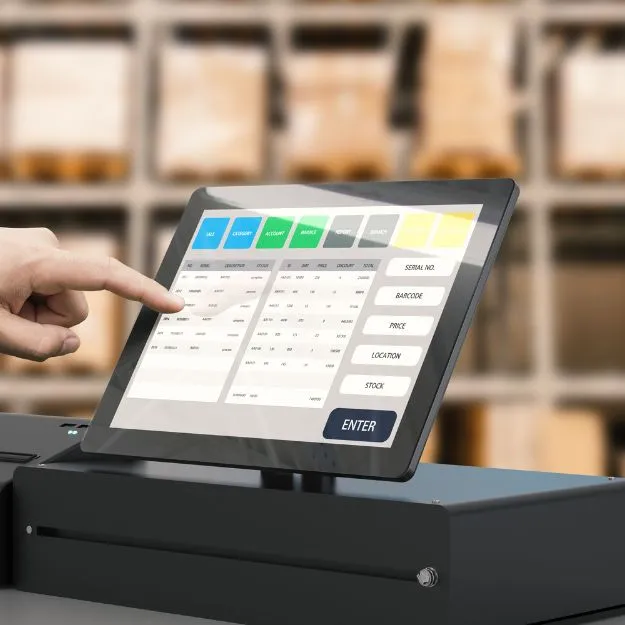
CS Desk POS
Install on counter PCs for high-volume checkout with receipt printers, barcode scanners, cash drawers, and offline-capable billing at fixed store locations.

Point of Sale Software
Bill customers in seconds, control stock across locations, and run retail or wholesale operations from one dependable platform — available as desktop, cloud, or mobile POS.
Why Retail Teams Choose Our POS
3
Deployment options — desktop, cloud, and mobile
40+
Built-in features for sales, stock, and operations
Multi
Branch support with centralized control
24/7
Data backups and access control for peace of mind
Deployment Options
Use desktop counters, cloud access for multi-branch teams, or mobile devices on the shop floor — or combine them as your operation grows.
CS Desk POS
Install on counter PCs for high-volume checkout with receipt printers, barcode scanners, cash drawers, and offline-capable billing at fixed store locations.
CS Cloud POS
Access your store from any browser with centralized data, real-time reporting, and synchronized inventory across branches — ideal for growing retail networks.
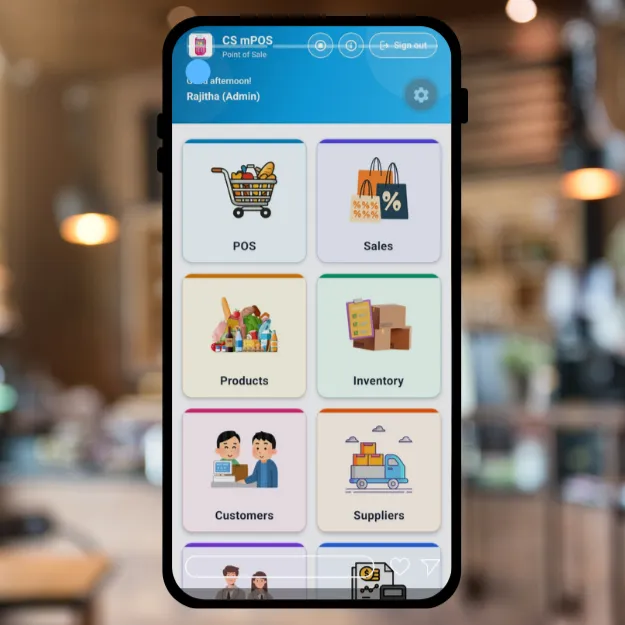
CS mPOS
Sell on tablets or smartphones for floor assistance, pop-up shops, delivery collections, and queue-busting checkout during peak hours.
Mobile companion
Your main till stays powerful — but customers do not always line up at one desk. CS mPOS turns Android phones and tablets into a full mobile point of sale for the shop floor, market stalls, and pop-up locations.
Industries & Store Types
Whether you run a single shop or multiple branches, our POS adapts to how your team works at the counter, in the aisle, and in the back office.
High-volume scanning, weighted items, promotions, and fast checkout during rush hours.
Batch tracking, expiry control, and compliant stock management alongside daily sales.
Variant sizes, barcode labels, customer profiles, and loyalty for repeat shoppers.
Serial tracking, warranties, credit sales, and detailed product specifications at billing.
Retail and wholesale pricing, bulk orders, credit terms, and supplier purchase workflows.
Large catalogs, box sizes, stock transfers between yards, and multi-location visibility.
Quick sales, parked orders, multiple payment methods, and shift-based cash register control.
Centralized reporting, store-level stock, inter-branch transfers, and role-based access.
This list is not exhaustive — our POS can be configured for many other retail and service business types beyond those shown above.
In Action

Full Feature Set
Explore sales, inventory, purchasing, loyalty, and reporting capabilities organized the way your team actually works.
Manage as many products as your business needs — from a corner shop to a large retail chain — without artificial limits on catalog size.
Add box sizes, product photos, variants, and detailed attributes. Clone products to speed up repetitive catalog setup.
Scan barcodes at checkout and during stock operations to reduce errors and speed up billing and inventory updates.
Track stock levels in real time, receive low-stock alerts, and plan replenishment so essential items stay available.
Track and manage product batches for compliance, traceability, and efficient stock handling across categories.
Move inventory between stores, warehouses, or counters with clear transfer records and updated balances.
Correct damaged goods, shrinkage, or count discrepancies quickly to keep inventory figures accurate.
Monitor expiry dates with alerts and reports so you can rotate stock and reduce write-offs before items expire.
Handle expired or near-expiry stock with structured return workflows that help minimize waste and protect margins.
Maintain weighted average costs as purchases arrive so margins and valuation reflect real inventory movement.
Barcode scanning, shortcuts, and a layout designed for cashiers to complete transactions quickly and accurately.
Process single items or bundled purchases in a few taps — ideal for busy counters and repeat transactions.
Offer credit terms to trusted customers while tracking outstanding balances and payment follow-up.
Review past transactions by date, customer, product, or cashier to analyze trends and resolve disputes.
Park in-progress bills and recall them later — useful when customers add items or step away mid-checkout.
Support both walk-in retail pricing and wholesale customer tiers from the same product catalog.
Accept cash, cards, bank transfers, and other payment types in one checkout flow.
Apply the correct tax rules for different products, categories, or jurisdictions automatically at billing.
Apply item-level or bill-level discounts to run promotions without manual price overrides.
Print or share receipts and invoices in formats suited to your brand and customer expectations.
Open and close shifts, balance drawers, and maintain accountability for cash handled at each register.
Create quotations for customers and convert approved quotes into sales when they are ready to buy.
Store customer profiles, purchase history, and contact details to deliver personalized service and targeted offers.
Reward repeat buyers with points on purchases and redeemable benefits that encourage return visits.
Process returns and exchanges with clear records that update stock and financial totals correctly.
Maintain supplier contacts, terms, and purchase history in one place for smoother procurement.
Generate, send, and track purchase orders so replenishment is planned instead of reactive.
Record every purchase against products and suppliers for full visibility into inbound stock and costs.
Track amounts owed to suppliers, due dates, and payment status to protect supplier relationships.
Manage multiple branches with location-specific stock, sales, and reporting from a centralized system.
Log store expenses alongside sales data so owners see a clearer picture of operational profitability.
Access a complete audit trail of sales, purchases, adjustments, and payments for review and reconciliation.
Keep staff records, assignments, and operational context organized for day-to-day store management.
Define roles and permissions so cashiers, supervisors, and managers see only what they need.
Low-stock alerts, sales summaries, profitability views, and filters that help you act on real data.
Set up taxes, payment types, bill formats, and workflows without deep technical knowledge.
Import large product catalogs, customer lists, or opening stock to go live faster.
Automated backups help protect business data against loss and support recovery when needed.
Onboarding guides and tutorials help new staff learn the system and use advanced features confidently.
Direct answers for investors evaluating CRM software. Need a tailored walkthrough? Contact our team.
We offer three POS deployment options: Desktop POS Software for fixed checkout counters, Cloud-Based POS for browser access and multi-branch synchronization, and CS mPOS — our Android mobile point of sale app for tablets and smartphones on the shop floor or at pop-up locations.
Our POS is suitable for supermarkets, pharmacies, fashion boutiques, electronics shops, wholesale distributors, hardware stores, cafés, quick-service counters, and multi-branch retail chains that need billing, inventory, and reporting in one system.
Yes. The platform includes stock control, batch management, stock transfers, adjustments, expiry tracking, low-stock alerts, and purchase workflows so sales and inventory stay aligned.
Yes. You can serve retail customers at standard pricing and wholesale buyers with appropriate pricing tiers, credit terms, and quotations from the same product catalog.
Yes. The system supports multiple payment methods at checkout and configurable tax rates for different products or jurisdictions, simplifying compliance and customer convenience.
No. You can manage unlimited products, making the system suitable for small shops and large retailers with extensive catalogs.
Contact C Soft Lanka Technologies through our contact page or call (+94) 77 143 1054. Share your business type, number of locations, and preferred POS variant — desktop, cloud, or CS mPOS on Android — and our team will guide you through the next steps.
CS mPOS is our Android point of sale app. It turns phones and tablets into a full checkout system with product catalog, barcode scanning, split payments, customer loyalty, shift control, reports, and Bluetooth or PDF receipts. See https://csoftlanka.com/products/cs-mpos for full details.
Yes. Sales, products, and customer records are stored on the device, so checkout and day-to-day work continue when Wi‑Fi or mobile data is weak or unavailable. You can back up data on the device and restore when moving to a new phone or tablet.
CS mPOS runs on Android phones and tablets. The interface adapts to different screen sizes and works in portrait or landscape — suitable for a counter tablet or a phone carried around the store.
Yes. Many businesses run desktop or cloud POS at the main till and use CS mPOS for floor sales, queue-busting, or secondary counters. CS mPOS is built as a focused mobile selling app; desktop and cloud POS cover larger multi-branch and back-office needs.
Yes. CS mPOS supports compatible Bluetooth receipt printers, and you can generate PDF receipts to share by message or email. Your store name and details appear on receipts for a professional checkout experience.
Yes. CS mPOS includes stock tracking with automatic updates on sales, opening and closing cash shifts, customer records, a points-based loyalty programme, quotations, refunds, expenses, and built-in sales reports filtered by date.
Choose desktop POS for high-volume fixed counters with scanners and cash drawers. Choose cloud POS when you need centralized data, browser access, and reporting across multiple branches. Choose CS mPOS on Android when you need mobile checkout, offline selling, or a lightweight till without a full desktop setup.
Tell us about your store type and we will recommend the right POS variant — desktop, cloud, or mobile.